Bulk PDF Text Extractor
Every PDF in the Folder, as Text You Can Search
Convert PDF files to plain text or Markdown in batch, fully offline. Multi-column pages keep their reading order and tables are drawn as text grids. Free trial.
Full seller details: Legal information.
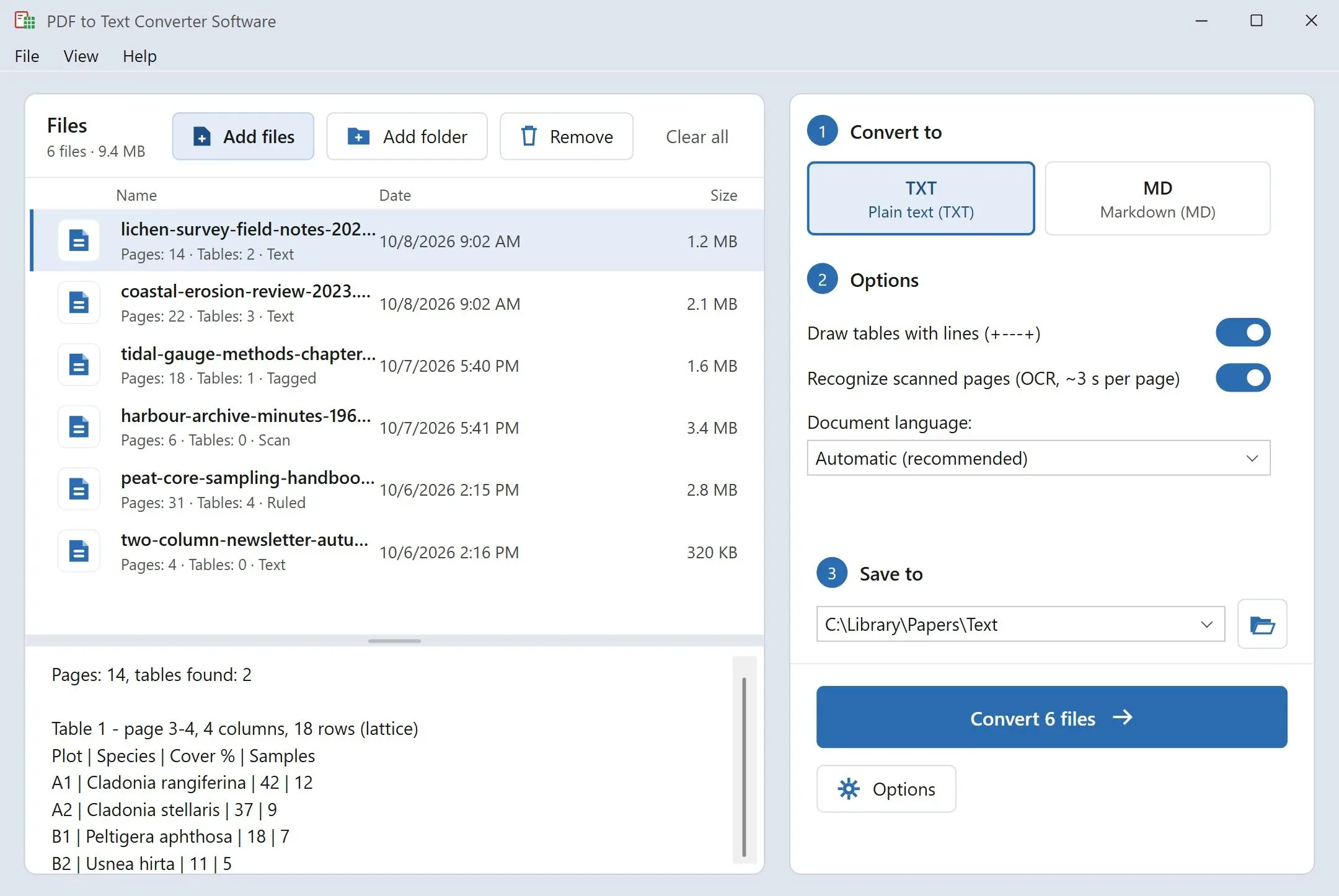
Add a folder of PDFs and get one .txt or .md file for each, written on your own Windows PC. Columns come out in the order you would read them, and tables keep every figure under the right header.
Getting the words out of a PDF should not take an afternoon
Select all in a PDF viewer, paste into Notepad, and a two-column paper turns into lines that jump between columns mid-sentence, while a table collapses into a string of numbers with nothing to tell them apart. Websites do a better job, one upload at a time, and keep your file on their server for a while. This program handles a whole folder in one go: it reads each PDF on your machine and writes plain text you can read, search and quote.
How to use it
Add files or a folder
Drop single PDFs or a whole folder into the list. Save the output next to each original or into one folder you choose. Two files with the same name from different folders get separate outputs, so nothing is overwritten by accident.
Choose plain text or Markdown
Plain text is UTF-8 with Windows line endings and a form feed between pages. Tables are framed with +---+ lines by default; switch that off and the columns are lined up with spaces instead. Markdown turns titles into # headings and tables into pipe tables.
Start the batch and search the results
One start covers the whole list. When it finishes, a summary tells you how many files were written and where. Point Windows search, your editor or grep at that folder and look up any phrase across every document at once.
Benefits
Columns read the way a person reads them
On a two-column journal page the whole left column is written first, then the whole right one. Sentences stay in one piece, and section titles are recognized by their size, so they do not end up in the middle of a paragraph.
Tables you can read in Notepad
A price list or a lab report keeps its grid: each figure stays under its column header, framed in plain characters any text editor can show. Only real tables get a grid, so a page of prose set in two columns stays prose.
Nothing leaves your PC
The PDF engine runs from the program folder on your own machine. There is no upload, no account and no network connection involved, so contracts, medical records and unpublished manuscripts stay where they are.
Why people use it
Scanned pages are recognized too
A page that is only a picture of paper goes through text recognition on your PC, at roughly 3 seconds a page. It covers Latin and Cyrillic scripts and needs 64-bit Windows. Pages that already have a text layer are taken as they are, and tables on a scan come out spaced into columns without the grid.
Ready for notes apps and AI assistants
Markdown output goes straight into a notes app, a wiki or a chat with an AI assistant without cleanup. Headings from # to ###### follow the size of the titles in the document, and tables become pipe tables with the first row as the header.
Text in many languages
PDFs with a text layer in Chinese, Japanese or Korean come out as readable text, and Hebrew and Arabic lines keep their right-to-left order. Everything is saved as UTF-8, so the file opens correctly in any modern editor.
FAQ
System Requirements
Bulk PDF Text Extractor
Languages
3.5
9 Mb
September 15, 2026
- Windows 11/10/8.1/8/7 (32/64 bit)
- Intel i3, AMD Ryzen 5 or above
- 4 GB of RAM or above
- NVIDIA® GeForce® series 8 and 8M, Intel® HD Graphics 2000, Quadro FX 4800, Quadro FX 5600, AMD Radeon™ R600, Mobility Radeon™ HD 4330, Mobility FirePro™ series, Radeon™ R5 M230 or higher graphics card with up-to-date drivers
- 1280 × 768 screen resolution, 32-bit color
- 1 GB of free hard disk space or above
GRT requirements trial note