
SSD Data Recovery
See What the SSD Still Holds, Then Copy It Off
Get files off a RAW or corrupted SATA, NVMe or USB SSD. A TRIM check before the scan tells you what the drive can still return. Preview first. Free trial.
Full seller details: Legal information.
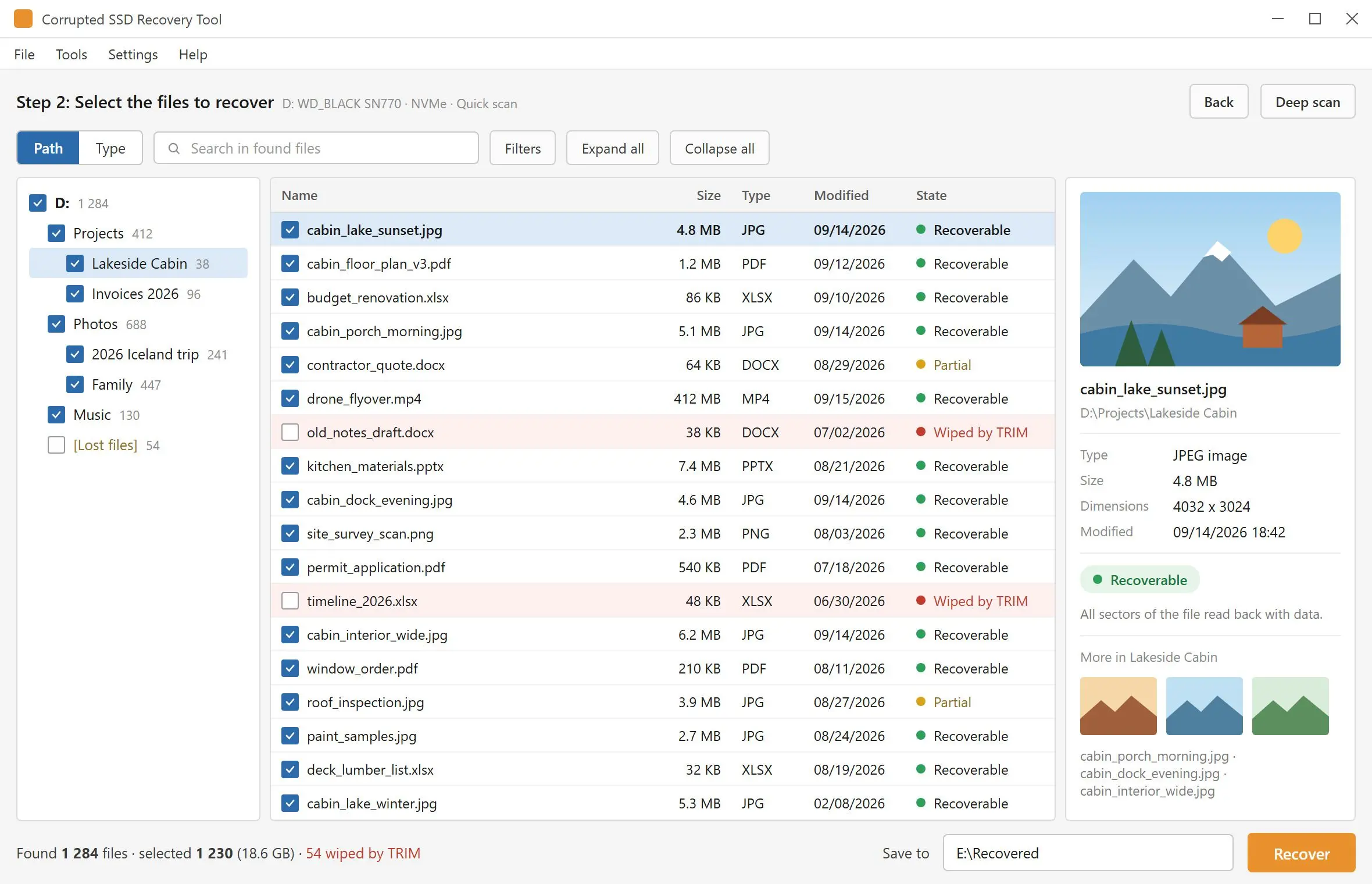
Point SSD Data Recovery at a SATA, NVMe or USB SSD that opens as RAW, asks to be formatted or lost its folders after a crash. It checks TRIM first, scans the volume, shows the files it found in a preview pane and saves the ones you tick to a different drive.
The drive is still listed, the folders are not
A power cut, a forced restart, a cable pulled mid-copy - and the volume that held the work now shows as RAW, or Windows offers to format it. In most of these cases the data is still in the cells and what broke is the file system that points to it. That is the job this program is built for. Files you deleted yourself are a different story on an SSD, because of TRIM, and the usual recovery tool lets you find that out last: it lists names and sizes, then hands back files full of zeros. Here you are told before the scan.
How to use it
Pick the SSD
Start the program and allow the administrator prompt - Windows will not open the volume of an internal drive without it. Internal and external drives are in one list, each with its media type and bus, so an NVMe system disk is hard to confuse with the USB SSD next to it.
Read the TRIM note and scan
For an internal SSD with TRIM enabled a note opens first, shows what was measured on that drive and asks whether to scan anyway. Quick scan reads the file system records in seconds. If it finds nothing, Deep scan takes over and reads the whole drive.
Preview, tick, save elsewhere
Click a file to open it in the preview pane, tick what you need and press Recover. The destination has to be a folder on another drive - the SSD being scanned is refused as a target, so nothing is written over the files you came for.
Benefits

TRIM is measured before the scan starts
Three readings are taken from an internal drive: whether it is solid state, whether the device reports TRIM support and whether Windows has delete notifications turned on. You see all three. If they add up to "deleted files are gone", you learn it in the first minute and not after an hour of scanning.
Empty files are called empty
On a TRIM drive the file table keeps listing names long after the cells behind them were cleared. When you recover, every block of each file is checked, and a file that comes out blank is marked "wiped by TRIM" and counted in the summary. The mark appears at the saving step, not in the scan results, so the scan list alone is not yet proof that a file is intact.

Internal SATA and NVMe drives are in the list
Fixed disks are shown along with external ones, including the laptop SSD that Windows itself runs from. M.2 is just the shape of the stick - the drive is NVMe or SATA and appears under that bus. The condition is that Windows still gives the volume a drive letter; an SSD the BIOS does not detect is a job for a lab with hardware tools.
Why people use it
Get the files out first, repair the drive after
A format prompt usually means the index is damaged, not that the documents are gone. Formatting writes a fresh file table over the records a scan still needs, and on an internal SSD Windows may send TRIM to the whole volume while it does so. Scan and copy the files off while the drive is in the state it failed in. Fixing or reformatting it can come afterwards.
Signature search when the file records are lost
If the file system no longer describes a file, Deep scan looks for the file itself by its signature - 34 types in 7 groups, among them JPG and PSD images, camera raw files, archives, video and SQLite databases. Files found this way come back without their original names and folders, so the preview pane is how you tell them apart.
A USB SSD often keeps what an internal one drops
Many USB enclosures do not pass TRIM to the drive inside, so files deleted from a portable SSD, or a quick-formatted one, can still be there to find. It is not a rule: newer UASP enclosures can pass TRIM, and then a delete is as final as on an internal drive. The scan and preview show which of the two you have.
FAQ
System Requirements
SSD Data Recovery
Languages
4.15
6.7 Mb
October 28, 2026
- Windows 11/10/8.1/8/7 (32/64 bit)
- Intel i3, AMD Ryzen 5 or above
- 4 GB of RAM or above
- NVIDIA® GeForce® series 8 and 8M, Intel® HD Graphics 2000, Quadro FX 4800, Quadro FX 5600, AMD Radeon™ R600, Mobility Radeon™ HD 4330, Mobility FirePro™ series, Radeon™ R5 M230 or higher graphics card with up-to-date drivers
- 1280 × 768 screen resolution, 32-bit color
- 1 GB of free hard disk space or above
GRT requirements trial note