Flash Recovery
Your Flash Drive Looks Empty—That Does Not Mean the Files Are Gone
USB stick “empty” after a bad eject or delete? Scan, preview recoverable photos & documents, save to another drive—Windows recovery without jargon. Try before you panic-format.
Full seller details: Legal information.
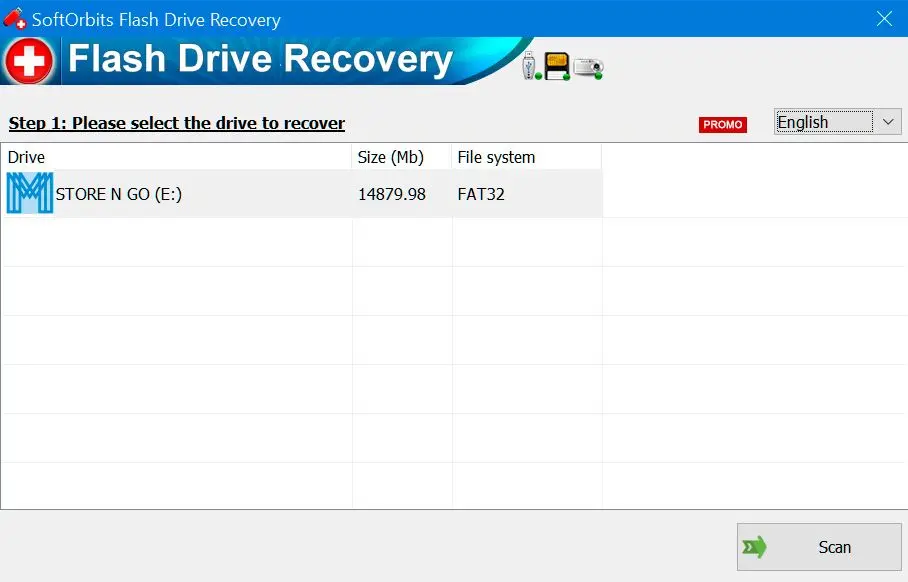
Works with the drives people actually carry: small USB keys, SD adapters, and similar removable volumes on Windows.
Start with a preview, not a guess
You see file types and thumbnails where possible before you recover, which cuts down on junk restores.
How to use it
Connect the drive
Plug in the USB stick, memory card, or removable disk and launch the app when Windows still sees the device.
Scan and preview
Run a scan, browse recoverable files, and choose a different disk or folder to save data—never back onto the failing media.
Recover and verify
Restore the items you need, open a few in their real apps, then reuse the drive only after you are sure files are safe.
Benefits

Rescue travel and work drives
When a USB stick or SD card suddenly looks empty, scan it before you reuse the hardware—many files are still recoverable if you avoid overwriting them.
Preview before you restore
See thumbnails and file types so you bring back photos and documents you actually need instead of filling disk with junk restores.


Save somewhere safer
Write recovered data to another disk or folder so you do not thrash the same flash cells while you are still unsure what survived.
Why people use it
Focused on removable media
The flow assumes you plugged something in and Windows still sees the hardware.
Safer target saves
You pick a different disk for recovered data so you do not thrash the same flash cells.
Honest expectations
Severely overwritten files may be gone; the app tells you what looks intact.
FAQ
System Requirements
Flash Recovery
Languages
4.0
6.7 Mb
August 30, 2026
- Windows 11/10/8.1/8/7 (32/64 bit)
- Intel i3, AMD Ryzen 5 or above
- 4 GB of RAM or above
- NVIDIA® GeForce® series 8 and 8M, Intel® HD Graphics 2000, Quadro FX 4800, Quadro FX 5600, AMD Radeon™ R600, Mobility Radeon™ HD 4330, Mobility FirePro™ series, Radeon™ R5 M230 or higher graphics card with up-to-date drivers
- 1280 × 768 screen resolution, 32-bit color
- 1 GB of free hard disk space or above
GRT requirements trial note