
Windows Log Inspector
Event Logs That Explain Themselves
Read Windows event logs without guessing. Opens live channels, .evtx files brought from another PC and even damaged logs, explains what each Event ID means, alerts you in real time. Free trial.
Full seller details: Legal information.
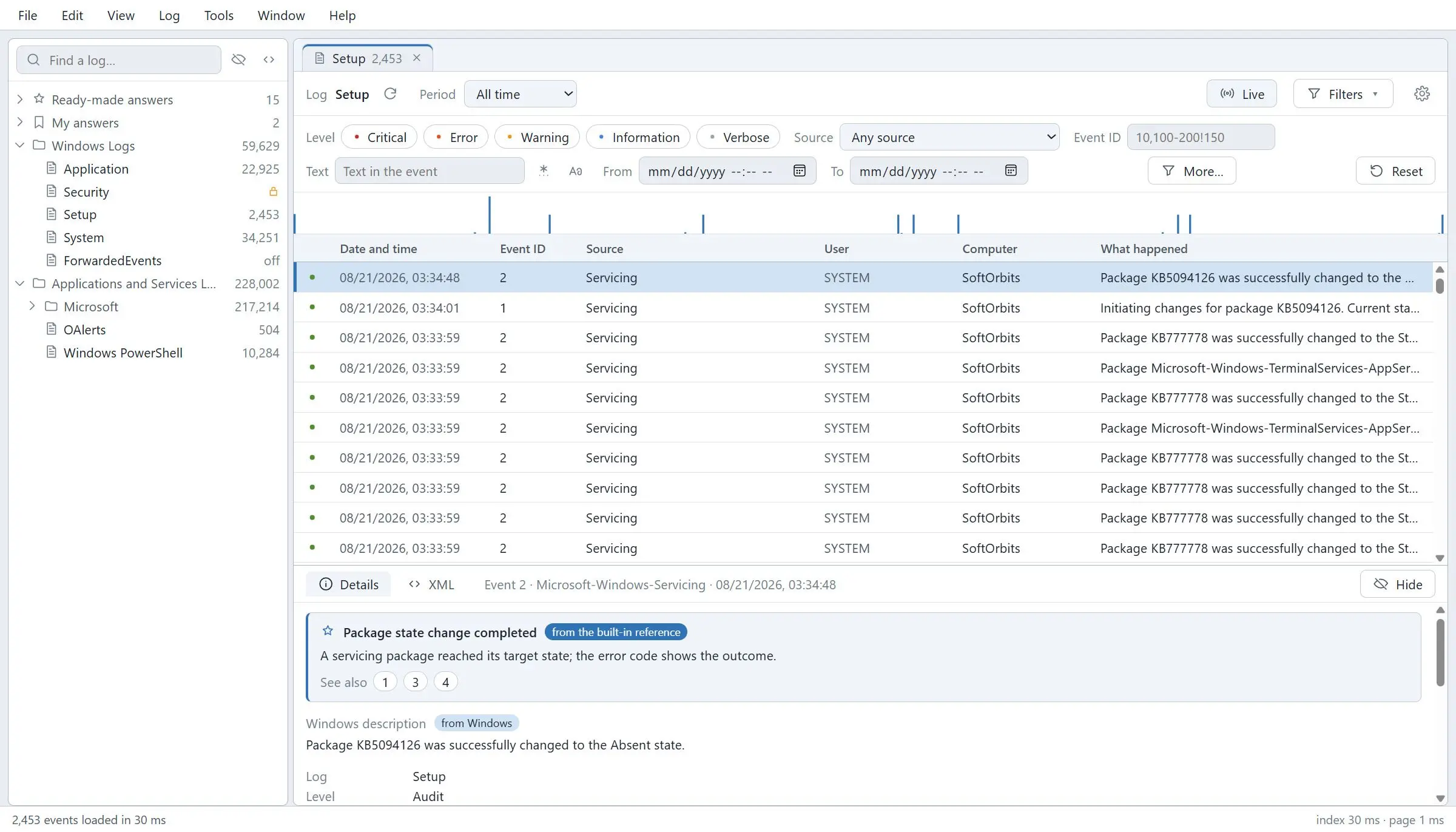
Open a live channel or an .evtx file carried over from another machine, cut 300 000 records down to the few that matter, and read what the Event ID means in plain English instead of searching for it.
The log is not the hard part. The wall of numbers is
A machine crashed, a service died, somebody got in, and the answer is somewhere in the event log. What you meet there is a list of numbers with no meaning attached, a filter dialog that takes a minute to think, and - the moment the log came from a different computer - the line "The description for Event ID cannot be found". That last one is not a bug: the text of the message lives in the DLL of the provider, and on your machine that provider is not installed. This reads the file anyway, and carries its own reference so the event has a meaning even when Windows has nothing to say about it.
How to use it
Open whatever you have
Live channels first - Application, System, Security, Setup and every log under Applications and Services. Then .evtx and .evt files: an archive from last year, a log a colleague zipped up and emailed, a file pulled off a machine that no longer boots. Nothing has to be imported or converted first.
Cut it down to the few lines that matter
Filters are handed to Windows as a query rather than applied afterwards, so 615 records out of 34 232 came back in 49 milliseconds in our own measurement. Search the text, merge two logs into one timeline sorted by time, and save the tabs and their filters as a workspace you reopen next week instead of rebuilding.
Find out what the event actually means
A built-in reference of 181 articles explains the common events in ordinary words and decodes their parameters - what logon type 3 is, why 4625 has a status code, what 6008 says about how the machine went down. On a live Windows 11 log it covered 94.6 percent of the entries.
Benefits

Somebody else's log stops saying "description not found"
Copy an .evtx off a server, open it on your own laptop, and the entries read as sentences. Where Windows cannot render the message because the provider is not installed here, the reference fills in what the event is and what its fields mean, so the file you were sent is worth opening at all.
Damaged logs open too
When the header of a file is destroyed the normal path refuses it and most viewers stop there. A signature scan walks the file for record chunks instead of trusting the header: on a deliberately wrecked test file that recovered 316 chunks and 23 367 records in 1.5 seconds. That is the case people pay forensic prices for elsewhere.


It keeps watching after you close the window
Write a rule - this event ID, this channel, this source - and get a tray alert when it happens. A failed logon, a disk warning, a service that keeps restarting reaches you while it is still happening, instead of being found next week by somebody scrolling.
Why people use it
Large logs stay responsive
A 300 000 record file indexed in about four seconds and held a 9 MB footprint while paging through it. Jumping to any point in a 34 000 event channel took single-digit milliseconds. Nothing is loaded into memory that you are not looking at.
Export to where the work continues
CSV, Excel, HTML and PDF for the report, and straight into Microsoft SQL Server when the events have to be queried or kept: 23 317 events landed in a table in 3.5 seconds, and the row count was verified afterwards with an independent client.
Your setup survives the reboot
Tabs, sources and filters are saved as a workspace file, and a selection can be frozen into a snapshot to send on. Reopening an investigation is one double click, not twenty minutes of rebuilding the same filters from memory.
FAQ
System Requirements
Windows Log Inspector
Languages
3.2
72 Mb
June 20, 2026
- Windows 11/10/8.1/8/7 (32/64 bit)
- Intel i3, AMD Ryzen 5 or above
- 4 GB of RAM or above
- NVIDIA® GeForce® series 8 and 8M, Intel® HD Graphics 2000, Quadro FX 4800, Quadro FX 5600, AMD Radeon™ R600, Mobility Radeon™ HD 4330, Mobility FirePro™ series, Radeon™ R5 M230 or higher graphics card with up-to-date drivers
- 1280 × 768 screen resolution, 32-bit color
- 1 GB of free hard disk space or above
GRT requirements trial note