Email File Importer for Mailboxes
Your Old Mail Files, Back in a Live Mailbox
Import PST, MBOX and EML files into Gmail, Microsoft 365 or any IMAP mailbox. Folders and original dates kept, and a resumed run skips what is already there. Free trial.
Full seller details: Legal information.
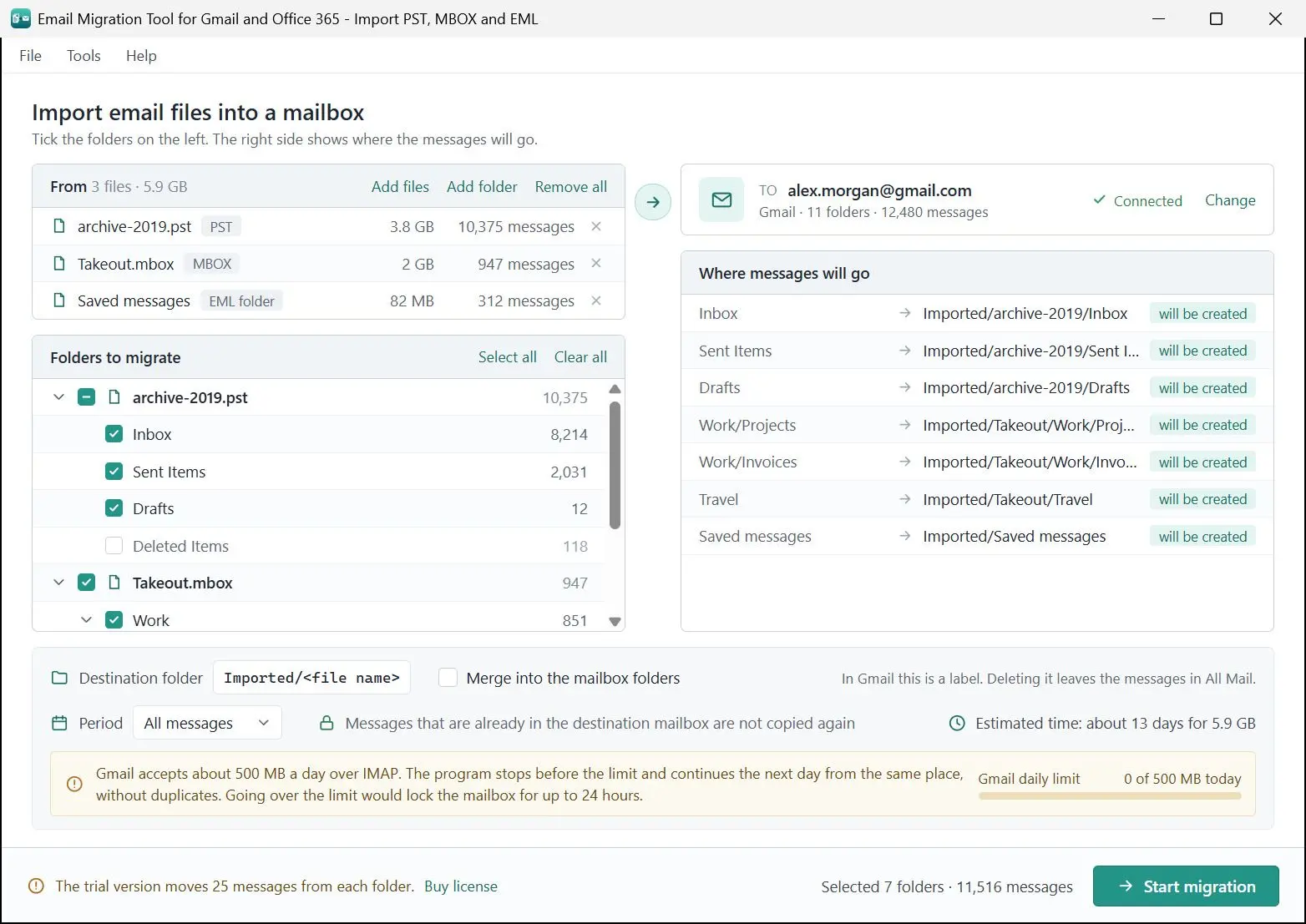
Add a PST from Outlook, an MBOX from Thunderbird or Google Takeout, or a folder of EML messages, then connect Gmail, Microsoft 365 or another IMAP mailbox. The mail goes up with its folder tree and original dates, and a run that gets cut off continues without making copies.
The mail is in a file. The file is not a mailbox
An export from the old computer, a Takeout archive from a school account, a PST a colleague left on a USB stick - the messages are all there, but you can only search them in the program that made the file. Gmail has no button for a PST, Thunderbird will not push an MBOX into an IMAP account, and Microsoft's own bulk upload is an admin job with AzCopy and a mapping file. If what you want is that mail in the mailbox you open every day, next to this week's messages, this program does that one job from your own PC.
How to use it
Add the files
Click Add files and pick one or more PST, MBOX or EML files, or use Add folder for a folder of EML messages with its subfolders. The format is recognized from the content, so a Thunderbird mail file with no extension is still read as MBOX. Your source files are only read, never changed.
Connect the mailbox
Choose the destination under Email service. Gmail takes your address and a Google app password. For Microsoft 365 or Outlook.com, click Sign in with Microsoft and type your password on Microsoft's own page. For any other provider, enter the IMAP server, port and security setting.
Pick the folders and start
Tick the folders you want; Deleted Items, Junk and Trash start unticked. By default everything lands in a folder called Imported, with one subfolder per file, or you can merge into the mailbox's own folders. The screen counts moved, already there and errors as it runs, and a plain-text log is waiting at the end.
Benefits

Original dates, not the import date
Manual imports often stamp every message with the day of the import. Here a message from 2019 still sorts under 2019: for PST the delivery time is used, for MBOX and EML the date written in the message. We checked on a live Gmail mailbox, and the dates matched to the second.
Stop it any time, run it again
Every delivered message is written to a journal. Close the lid, lose the connection or kill the process, and the next run skips what already arrived and carries on with the rest. In our own test the program was killed 4 times during a 130-message run, and the mailbox ended up with zero extra copies.


Straight from your PC to the mailbox
The files are read on your disk and the mail goes directly to Gmail, Microsoft or your IMAP server. There is no server of ours in between, passwords are not saved, and the Microsoft sign-in token is kept in memory only until you close the program.
Why people use it
Gmail's daily limit is counted for you
Gmail accepts roughly 500 MB a day over IMAP and can lock the mailbox for hours if you go past it. The program counts what it sent today and pauses before the limit, then continues after midnight if the window stays open. A 10 GB PST takes about 20 days, so start early if there is a deadline.
What comes across, file by file
From a PST: mail folders, attachments and inline pictures, read and draft status. Flags, categories, contacts and calendar items stay behind. From MBOX: messages as they are, with read, replied, starred and draft marks. EML files store no status, so they arrive as read. A PST does not keep the original message, so each email is rebuilt from its parts rather than copied byte for byte.
Sign in the way each provider wants
Microsoft 365 and Outlook.com open Microsoft's sign-in page, and the consent screen shows the name of the app registration this sign-in runs under, which is not the name of this program - that is expected. A work or school tenant may need an administrator to approve it, and the program has a note you can copy for them. Gmail needs an app password, which requires 2-Step Verification and may not be offered on work or school accounts.
FAQ
System Requirements
Email File Importer for Mailboxes
Languages
3.7
67.7 Mb
October 20, 2026
- Windows 11/10/8.1/8/7 (32/64 bit)
- Intel i3, AMD Ryzen 5 or above
- 4 GB of RAM or above
- NVIDIA® GeForce® series 8 and 8M, Intel® HD Graphics 2000, Quadro FX 4800, Quadro FX 5600, AMD Radeon™ R600, Mobility Radeon™ HD 4330, Mobility FirePro™ series, Radeon™ R5 M230 or higher graphics card with up-to-date drivers
- 1280 × 768 screen resolution, 32-bit color
- 1 GB of free hard disk space or above
GRT requirements trial note