Email Account Mover for IMAP
Old Mailbox on the Left, New One on the Right
Move mail between two mailboxes over IMAP: Gmail, Microsoft 365, Yahoo, iCloud or your own server. Folders, dates and flags kept, no duplicates. Free trial.
Full seller details: Legal information.
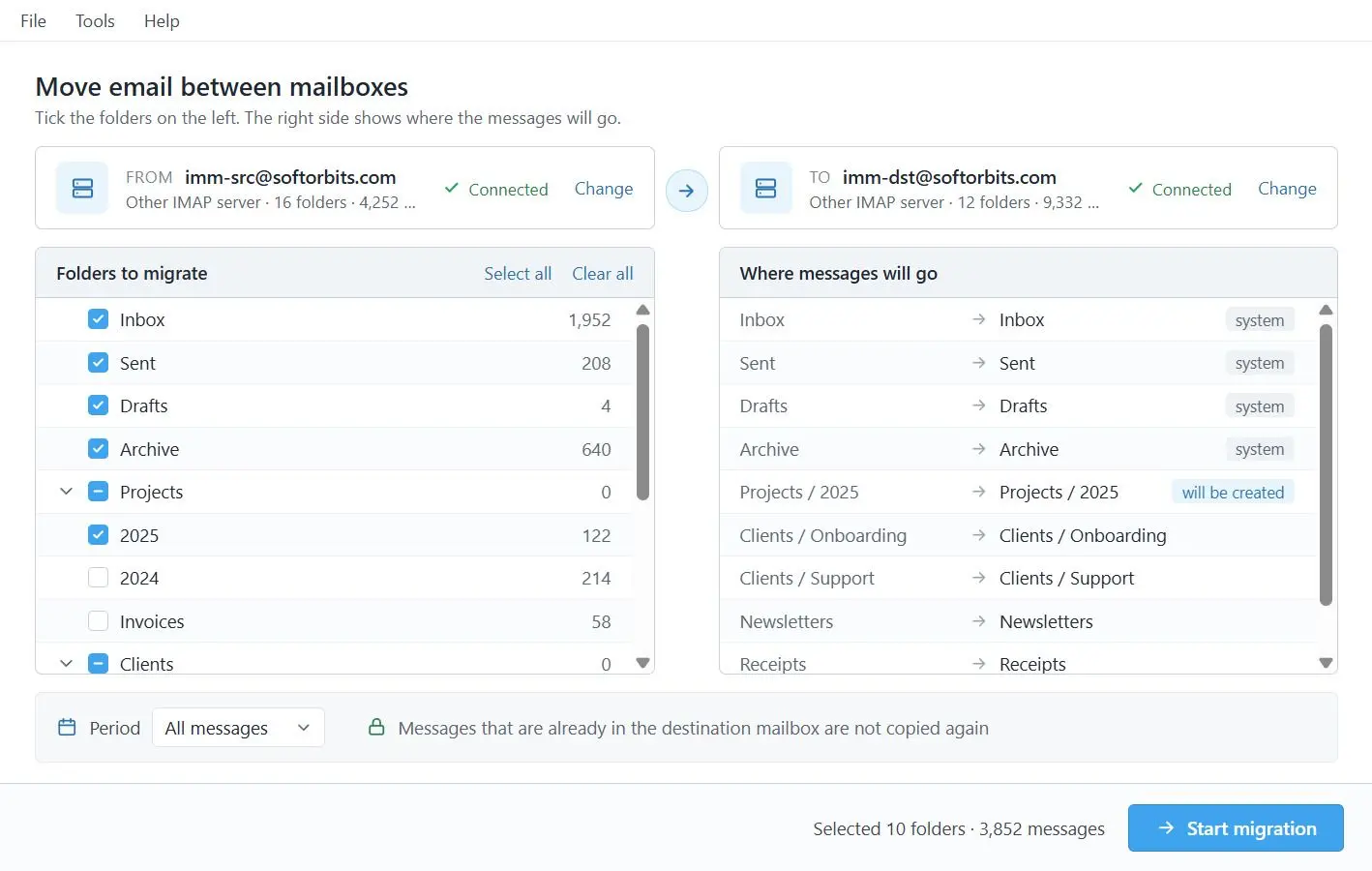
Sign in to the mailbox you are leaving and to the one you are moving into, pick the folders, and the mail is copied across over IMAP. Folders, original dates and read status arrive as they were, and a run that gets cut off picks up where it stopped without writing anything twice.
The new address takes five minutes. Ten years of mail does not
Opening the new account is the easy part. The old one still holds every receipt, contract and thread you might need again, on a server you are about to walk away from. Dragging folders between two accounts in a mail client works until the connection drops halfway, and after that nobody can say what made it across. Most migration programs answer with a wizard of many steps or a dashboard of jobs, built for an admin with a hundred mailboxes. Email Account Mover for IMAP is built for one mailbox, and it fits in one window.
How to use it
Sign in to both mailboxes
The mailbox you are leaving goes in the From panel on the left, the new one in the To panel on the right. Gmail, Yahoo and iCloud take a password or an app password, Microsoft 365 and Outlook.com open Microsoft's own sign-in page, and a hosting or company IMAP server works with its usual login.
Pick the folders
With both sides connected, the folder tree of the old mailbox is shown in the same window. Choose what should come across and leave the rest where it is.
Start, and resume if it stops
Messages are copied folder by folder with their original dates and flags. If the connection drops or the window gets closed, start it again: mail that was already delivered is recognized and skipped, and the run carries on from there.
Benefits

Both mailboxes in one window
From on the left, To on the right, and the folder tree alongside them. There is no wizard to click through and no job queue to manage, so you can see which account is which before anything is copied.
A broken run picks up where it stopped
Every delivered message is written to a journal, so a second run copies what is missing and nothing else. In our own test the program was force-closed five times in the middle of a run. The new mailbox ended with the same 2,160 messages as the old one - no extra copies, none missing.


Mail arrives the way it left
Folders keep their structure, each message keeps its original date, and read and flagged status come along with it. Messages are sent as raw bytes rather than rebuilt on the way: 20 of 20 test messages matched by SHA-256 checksum, one of them 13.9 MB.
Why people use it
Sign in the way each provider expects
Microsoft 365 and Outlook.com use Microsoft's own sign-in, so that password is typed on a Microsoft page and not into this program. Personal Gmail works with an app password, which Google issues once 2-Step Verification is on. Work and school Google Workspace accounts are not supported in this version, and a company Microsoft 365 tenant may ask an administrator to approve the first sign-in.
Repeated messages are carried over as they are
Some mailboxes hold the same message several times, and those copies are not collapsed into one. In our test a folder of 1,952 messages, 847 of them repeats by Message-ID, arrived as 1,952. What is prevented is a second copy of something this program has already delivered.
Built for one mailbox at a time
Each run moves one pair of accounts, and you sign in to both yourself. Loading a CSV list of mailboxes for a batch job is not part of the program, and neither is saving mail to a PST file or a local backup - the mail goes from one live mailbox into another.
FAQ
System Requirements
Email Account Mover for IMAP
Languages
3.7
67.7 Mb
September 24, 2026
- Windows 11/10/8.1/8/7 (32/64 bit)
- Intel i3, AMD Ryzen 5 or above
- 4 GB of RAM or above
- NVIDIA® GeForce® series 8 and 8M, Intel® HD Graphics 2000, Quadro FX 4800, Quadro FX 5600, AMD Radeon™ R600, Mobility Radeon™ HD 4330, Mobility FirePro™ series, Radeon™ R5 M230 or higher graphics card with up-to-date drivers
- 1280 × 768 screen resolution, 32-bit color
- 1 GB of free hard disk space or above
GRT requirements trial note