
Bank Check Writer and Printer
Print the Whole Check, MICR Line Included
Print bank checks on blank stock or pre-printed forms: MICR E-13B, amount in words, check register, payroll stubs, QuickBooks import. One-time price, no per-check fees. Free trial.
Full seller details: Legal information.
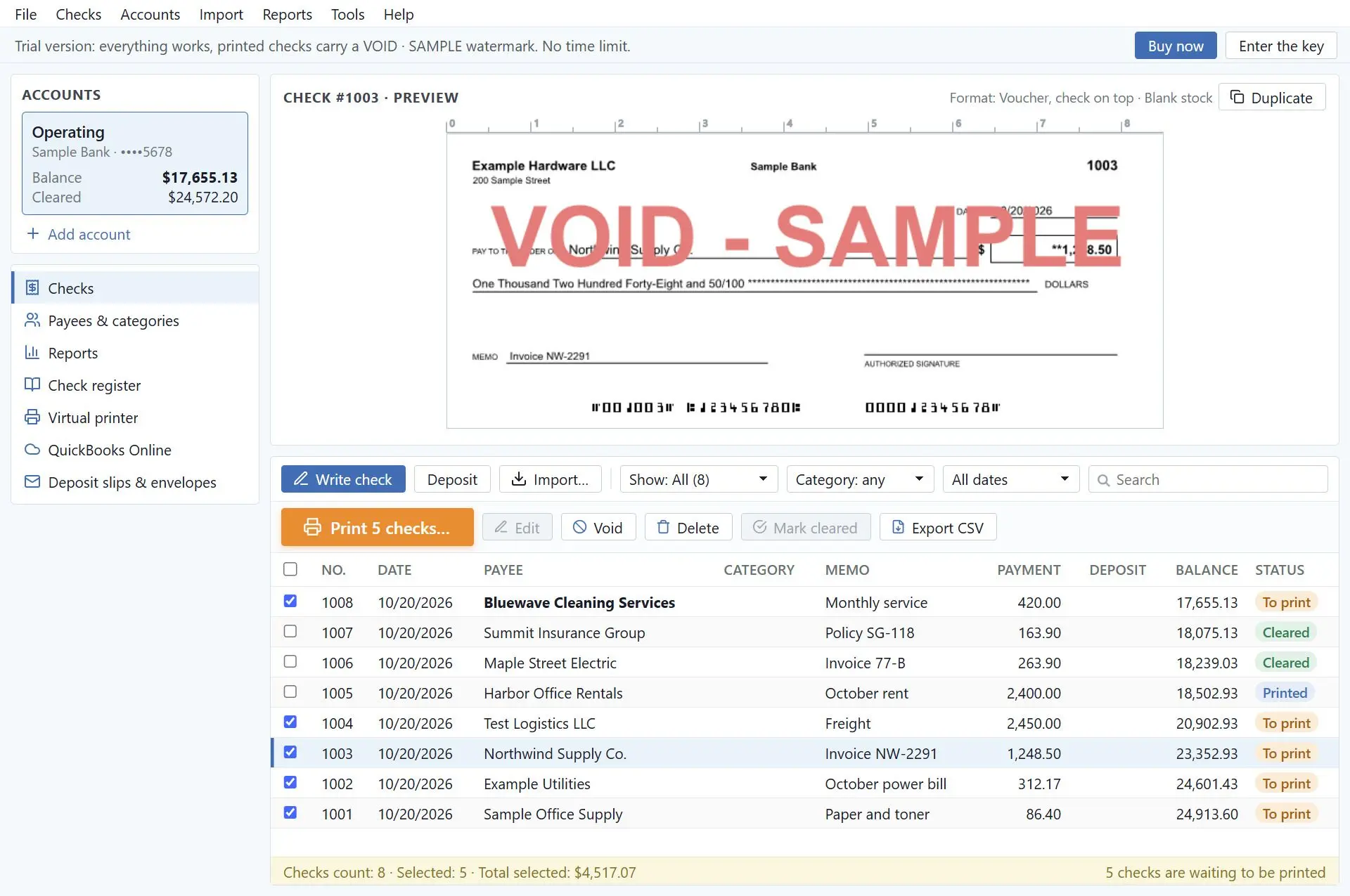
Enter the bank account once, then print checks on blank check stock with the bank details and MICR line, or fill in the computer checks your bank already sent you. The amount is written out in words, every check goes into a register, and payroll stubs, deposit slips and envelopes come out of the same program.
Out of checks, and the next box is a week away
Ordered checks run out at the worst moment, and every new account or company means another order. The online check services solve that with a monthly plan or a credit for every check you print, and they want your routing and account numbers on their website. This program keeps the bank details on your own PC and prints them onto plain check stock at the moment you press Print. You can buy the license once, and nothing is charged per check.
How to use it
Add the bank account
Type in the routing and account numbers from a current check. The routing number is tested against the ABA checksum as you type, and a live sample of the MICR line lets you compare it with the check in your hand before anything is printed.
Write the check
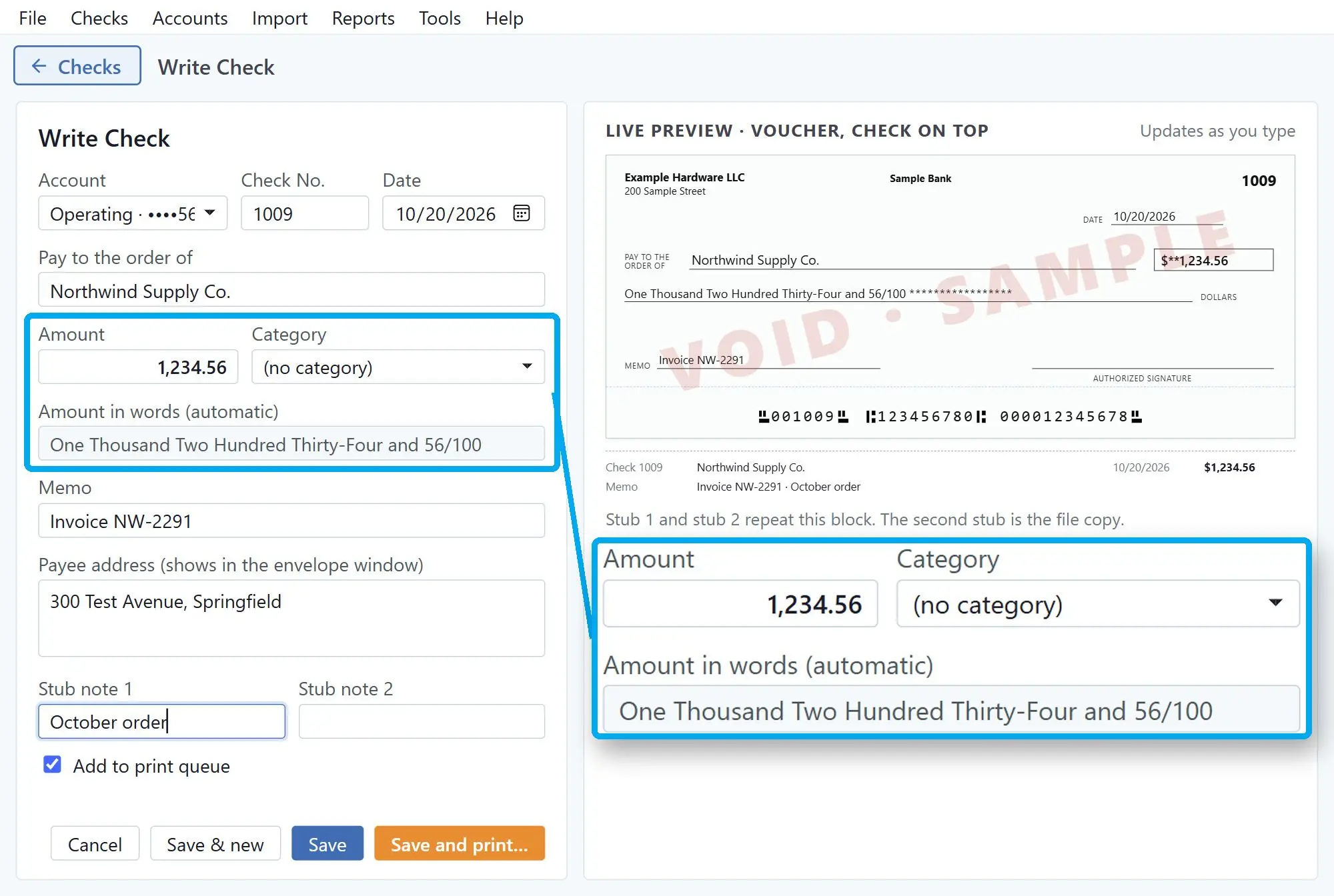
Pick a payee and enter the amount; the words are filled in US style, for example One Thousand Two Hundred Thirty-Four and 56/100. Add a memo and stub notes, then print right away or leave it in the print queue. Thirty vendor bills can come in at once from a CSV or Excel file, with its columns matched to the check fields.
Line up the paper and print
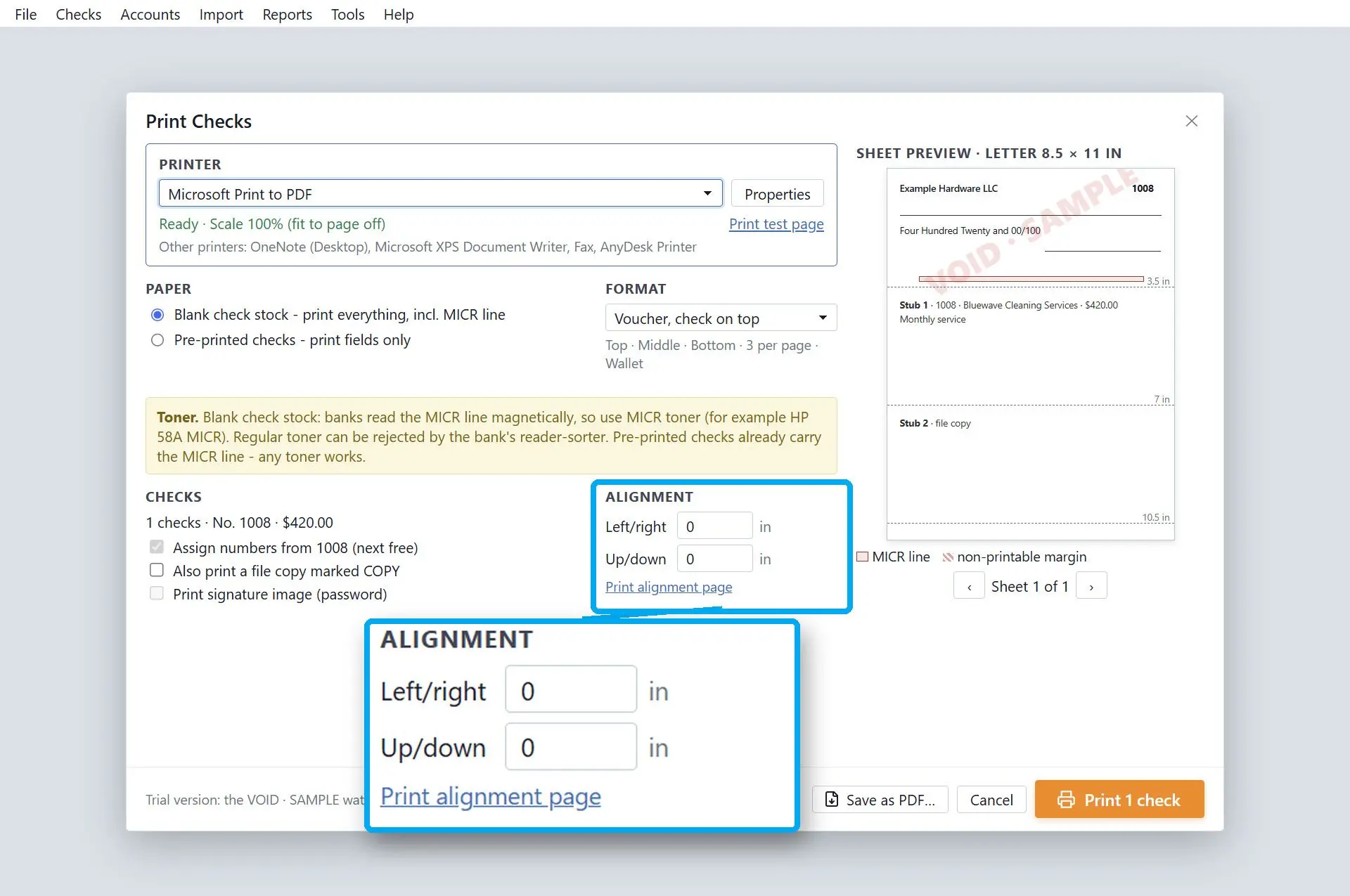
Choose blank stock to print everything, MICR line included, or pre-printed checks to print the fields only. Print the alignment page on plain paper, hold it against a check sheet and nudge any field left, right, up or down. Printing is fixed at 100% scale, so the layout does not shrink to fit.
Benefits
An E-13B MICR line on blank stock
The MICR line is set in a built-in E-13B font 3/16 inch from the bottom edge, and the clear band under it is kept empty so no other field can overlap. Before printing, your printer's margins are compared with the layout, and you get a warning if the MICR line would be cut off. On blank stock, use MICR toner.
A register you can reconcile
Every check is recorded, along with deposits and debits. Running and cleared balances sit at the top, and checks are marked cleared as the statement arrives. Numbers run in order per account and are never reused, a voided check keeps its number, and a reprint asks for a reason that goes into the print log. The whole register exports to CSV.
Bank details stay on your PC
Accounts, payees and amounts are kept in one database file on your disk, encrypted with AES-256-GCM. Set a password, or let Windows protect the file for your user account. Nothing is sent to a cloud. A forgotten password cannot be recovered by anyone, support included, so write it down.
Why people use it
Payroll stubs from your payroll export
Voucher stubs show gross pay, deductions, net pay and year-to-date totals taken from a CSV export. Profiles for Gusto, ADP and QuickBooks Payroll exports are built in, and other files can be mapped by hand. The program prints the numbers it is given. It does not calculate taxes.
Checks from QuickBooks Desktop and Sage 50
Setup adds a virtual check printer, and Windows asks for administrator permission once. Print checks to it from QuickBooks Desktop, Sage 50 or another accounting program, and your bank details and MICR line are added for blank stock. There is no direct QuickBooks Online connection: save the checks as PDF and open the file in the program.
Seven layouts and the paperwork around them
Voucher checks at the top, middle or bottom with two stubs, 3 per page, 3 per page mailable, 4 per page and wallet size, all on US Letter. Also deposit slips with up to 10 lines, #10 and window envelopes, a signature image behind a print password, and a Positive Pay file in the column order your bank asks for.
FAQ
System Requirements
Bank Check Writer and Printer
Languages
3.7
70 Mb
August 30, 2026
- Windows 11/10/8.1/8/7 (32/64 bit)
- Intel i3, AMD Ryzen 5 or above
- 4 GB of RAM or above
- NVIDIA® GeForce® series 8 and 8M, Intel® HD Graphics 2000, Quadro FX 4800, Quadro FX 5600, AMD Radeon™ R600, Mobility Radeon™ HD 4330, Mobility FirePro™ series, Radeon™ R5 M230 or higher graphics card with up-to-date drivers
- 1280 × 768 screen resolution, 32-bit color
- 1 GB of free hard disk space or above
GRT requirements trial note