Spreadsheet Merger and Comparison Tool
Combine the Files, Then Spot the Changes
Combine dozens of Excel and CSV tables into one file, then compare two versions and see every changed cell, added row and deleted row. Runs without Excel installed. Free trial.
Full seller details: Legal information.
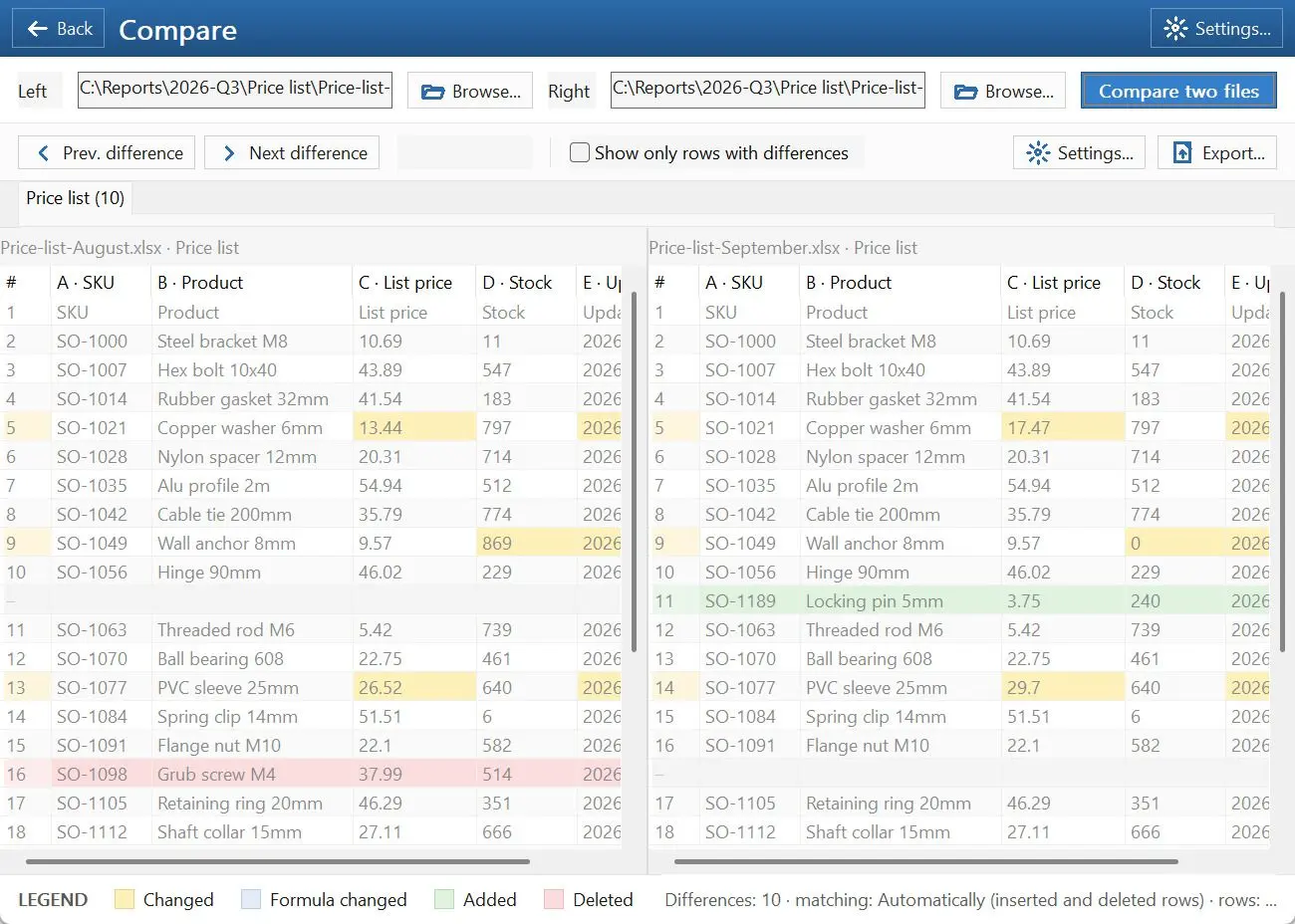
Hand it a folder of XLSX, XLSM, CSV or TSV tables and get back one file - rows stacked into a single sheet, or a workbook where each source became its own sheet. Hand it two versions of one table instead and every difference is coloured in.
Fifteen files and no two headers match
Branch exports, monthly reports, a CRM that dumps its data a thousand rows at a time - the pile always arrives as separate files, and the columns are never in the same order twice. Copy and paste gets it done and quietly loses a row somewhere in the middle. Power Query can do the merge, but only once the tables are already shaped alike, and telling you what changed between two versions is something it cannot do at all.
How to use it
Add the files
Point it at the files or at the folder holding them. XLSX, XLSM, CSV and TSV are read directly, with no Excel on the machine and no upload anywhere - the tables are opened from your own disk.
Merge or compare
Merging writes one sheet with the rows stacked, or a workbook with one sheet per source, columns matched by their headers rather than by position. Comparing takes two versions and marks changed values, added rows, deleted rows and differing formulas.
Take the result out
Save the merged table as XLSX or CSV. From a comparison, export an XLSX with the differences shaded into the cells - that is the copy you send to a colleague who does not have this installed.
Benefits

Columns matched by name, not by position
One file has Date, Amount, Client and the next has Client, Date, Amount. They are lined up by header, and a column that appears in only some of the sources still gets a place of its own instead of quietly overwriting a neighbour.
Differences are shown, not listed
Changed cells, new rows and removed rows are coloured in a grid you scroll, so you read the table the way you already read it. A list of cell coordinates tells you where to look; this shows you what changed.


No Excel, no upload, no account
It reads and writes the file formats itself, so it runs on a machine with no Office licence at all. Nothing is sent anywhere, which is what makes it usable on payroll, pricing and client data that must never go through a website.
Why people use it
Tell it which column identifies a row
Pick the key column - order number, employee id, article code - and rows are matched by that instead of by line number. Insert a row at the top of one version and the comparison stays sensible rather than reporting that everything moved.
Ignore what you do not care about
Letter case, stray spaces and formatting can be left out of the comparison, values compared instead of formulas, and a numeric tolerance set so a rounding difference in the last decimal is not reported as a change.
Split a big table back apart
The same engine runs the other way: cut a large sheet into files of N rows, or into one file per value in a chosen column, so each branch or each month gets only its own part.
FAQ
System Requirements
Spreadsheet Merger and Comparison Tool
Languages
3.2
12 Mb
June 24, 2026
- Windows 11/10/8.1/8/7 (32/64 bit)
- Intel i3, AMD Ryzen 5 or above
- 4 GB of RAM or above
- NVIDIA® GeForce® series 8 and 8M, Intel® HD Graphics 2000, Quadro FX 4800, Quadro FX 5600, AMD Radeon™ R600, Mobility Radeon™ HD 4330, Mobility FirePro™ series, Radeon™ R5 M230 or higher graphics card with up-to-date drivers
- 1280 × 768 screen resolution, 32-bit color
- 1 GB of free hard disk space or above
GRT requirements trial note