Bank Statement Data Extractor
Get the Numbers Out of the PDF and Into a Spreadsheet
Extract tables from PDF into CSV in batch, fully offline - scans are recognized on your own PC, nothing is uploaded. Multi-page tables are merged and repeated headers dropped. Free trial writes 10 rows.
Full seller details: Legal information.
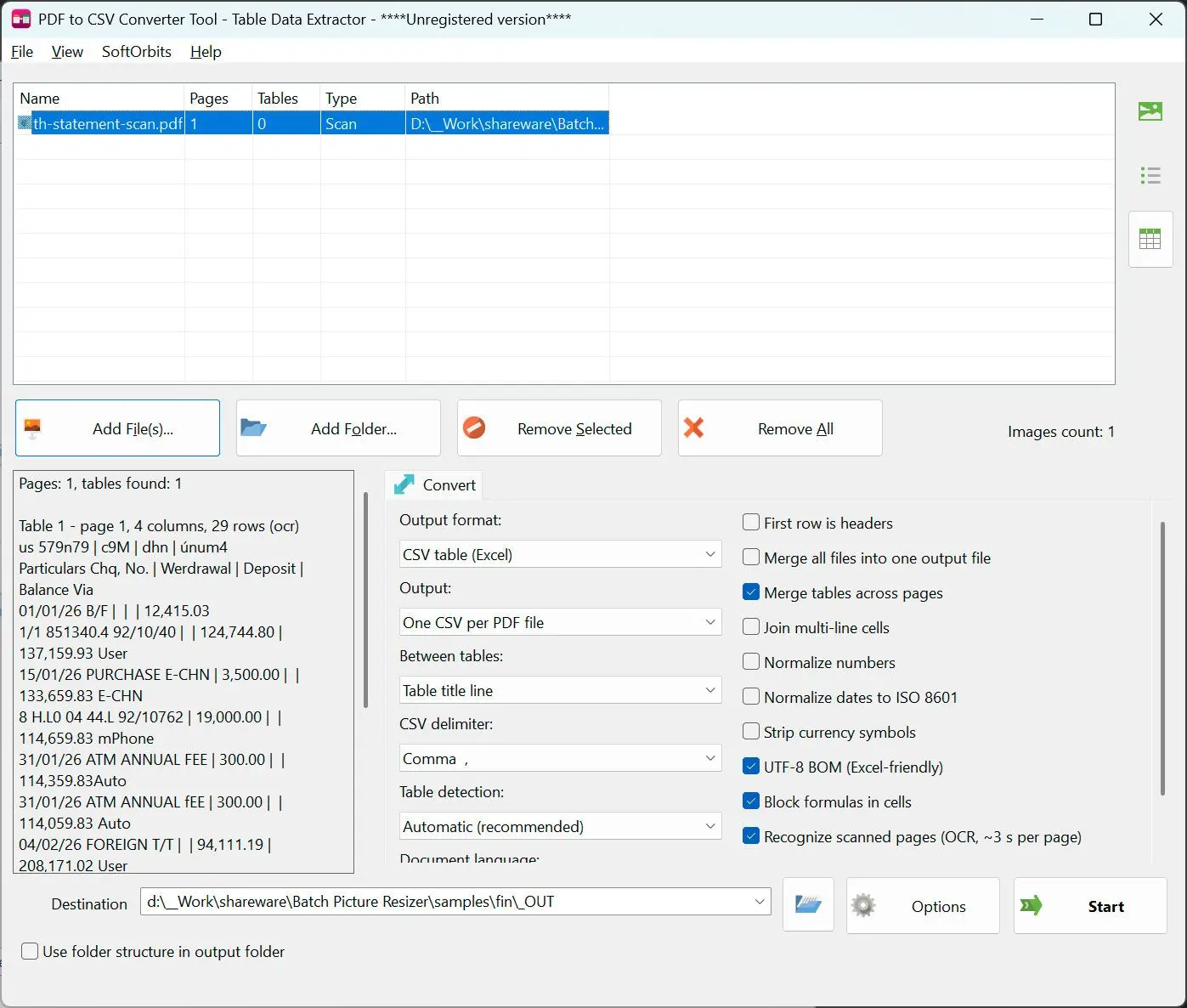
Point it at a folder of statements, invoices or price lists and get CSV files Excel opens straight away. Everything is read on your own Windows PC - the documents never travel to anyone's server.
Copy and paste is not a workflow
A table locked inside a PDF is data you cannot sort, filter or total. The free web converters will do one file at a time, and only after you hand them a bank statement or a payroll report. The command line tools are accurate but expect Java or Python. This one is an ordinary Windows program: pick files, pick options, get CSV - in batch, with nothing leaving the machine.
How to use it
Add the documents
Drop in one PDF or a whole folder. Turn on Merge if every file should end up in one CSV, or leave it off and get one CSV per document. The preview tells you how many pages and tables were found before anything is written.
Let it pick the reading route
Tagged, lattice and stream detection are all on by default, and each page gets the route that fits it. A page with no text layer at all goes to offline recognition instead. You can force a single route if you already know what your files look like.
Write CSV or QBO
CSV comes out as RFC 4180 with a UTF-8 byte order mark, so accented and Cyrillic text opens correctly on a double click. Choose QBO instead and the transactions are written for QuickBooks import, with the bank picked from the built-in directory.
Benefits
Scans are read on your own PC
A statement with no text layer is recognized locally, in a separate process on your machine, with no upload and no account. Latin and Cyrillic documents are covered; CJK, Arabic, Thai, Greek and Hebrew are not.
A 40 page statement becomes one table
Tables that run across pages are stitched back together and the header that repeats at the top of each page is dropped instead of landing in the middle of your data. That is the part web converters get wrong most often.
Whole folders, unattended
Queue a year of statements and walk away. The same options apply to every document, so the output set is consistent and ready to concatenate. Expect around 3 seconds per page on a scanned document.
Why people use it
Accounting negatives understood
An amount printed as (1,234.56) comes out as -1234.56, so your totals are right the first time. Thousands separators, both decimal marks, currency symbols and dates can be normalized too - those are checkboxes, off until you ask.
Safe to open in Excel
A cell from someone else's PDF that starts with = + - or @ is written with a leading apostrophe, so a formula smuggled into an invoice does not run when you double click the file. Numbers and bracketed amounts are left alone.
Headers resolved, not guessed at
When the PDF carries table markup the column names are read from the document itself. When it does not, the first row is judged on font, weight, fill and whether it holds numbers - and you can override the answer with one checkbox.
FAQ
System Requirements
Bank Statement Data Extractor
Languages
1.0
9 Mb
August 16, 2026
- Windows 11/10/8.1/8/7 (32/64 bit)
- Intel i3, AMD Ryzen 5 or above
- 4 GB of RAM or above
- NVIDIA® GeForce® series 8 and 8M, Intel® HD Graphics 2000, Quadro FX 4800, Quadro FX 5600, AMD Radeon™ R600, Mobility Radeon™ HD 4330, Mobility FirePro™ series, Radeon™ R5 M230 or higher graphics card with up-to-date drivers
- 1280 × 768 screen resolution, 32-bit color
- 1 GB of free hard disk space or above
GRT requirements trial note