
Web Archive to PDF Exporter
Saved Pages In, PDFs Out, Nothing Uploaded
Turn a folder of .mht and .mhtml web archives into PDF on your own PC. Nothing is uploaded, and pictures and layout stay with the page. Free trial.
Full seller details: Legal information.
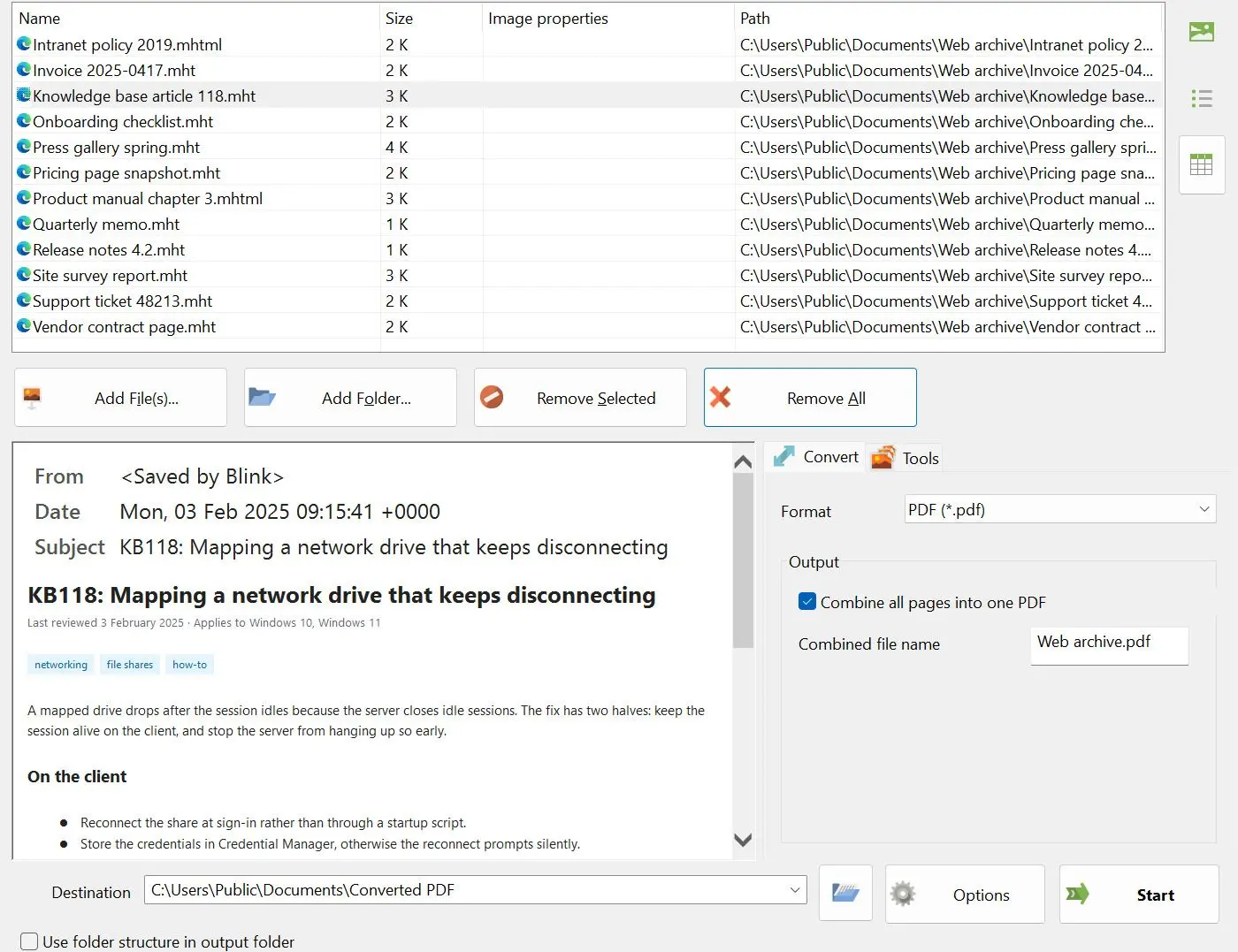
Web Archive to PDF Exporter reads the .mht and .mhtml files that browsers and Word write when you save a page as a single file, and turns them into PDF on your own Windows PC. Load one archive or a few hundred - the whole list is converted in a single run.
A folder of saved pages that nothing wants to open
Somebody saved those pages for a reason - a manual, a receipt, a thread that has since been deleted. Now they sit in a format that most devices will not display. Search for a way out and every result is a website asking you to upload the file, one at a time. That is fine for a recipe. It is not fine for a client record, and it is not a plan for four hundred files.
How to use it
Add the archives
Drag .mht and .mhtml files into the window, or pick them in the file dialog. Both extensions are the same kind of file and are treated the same way. The archives are opened from your disk - there is no upload step and no account.
Choose how the result is packed
Leave the defaults and every archive becomes its own PDF. Tick the combine option, type a file name, and the whole list is written into one document instead.
Pick a folder and press Start
Point the output at any folder you like and start the run. The PDFs land there, ready to attach, file or print on a machine that has never seen a web archive.
Benefits

The whole list in one run
Printing one saved page to PDF from a browser is free and takes a minute. Doing it for a folder of them takes an afternoon of open, print, save, close. Here the list goes in once and you press Start once.
Your archives stay on your disk
Conversion happens on your PC. The file is not sent to a server, and the program does not go back to the internet for a fresh copy of the page either - it works from what is inside the archive. That is what makes it usable for case files, support tickets and anything else a web form should never receive.

Pictures and layout come along
A web archive carries the page text, its images and its style sheets in one container. All of it is unpacked and rendered, so the PDF shows the page with its pictures in place rather than a column of bare text. Treat it as a faithful document copy, not a pixel-for-pixel screenshot of a browser window.
Why people use it
Reads archives from Chrome, Internet Explorer, Edge and Word
Internet Explorer and the old Edge wrote these files under "Save as webpage, single file". Chrome still offers the same thing as "Webpage, Single File", and Word can save a document that way too. Each one packs the container a little differently, and all of them are read. One known rough spot: Word archives with VML drawings can come out with a picture sitting over the text.
Current page layouts hold their shape
Rendering is done by the Microsoft Edge engine, so pages saved from a present-day browser keep their structure. CSS Grid, Flexbox, custom properties, calc() and sticky positioning are all handled, which means columns stay columns instead of collapsing into one long strip.
Built for one job: saved archives to PDF
The input is a .mht or .mhtml file that already exists on your disk. The program does not download pages from a web address, does not run OCR on pictures, and does not turn a PDF back into an archive. Everything it has goes into doing the one conversion well, for as many files as you give it.
FAQ
System Requirements
Web Archive to PDF Exporter
Languages
3.8
18.5 Mb
August 29, 2026
- Windows 11/10/8.1/8/7 (32/64 bit)
- Intel i3, AMD Ryzen 5 or above
- 4 GB of RAM or above
- NVIDIA® GeForce® series 8 and 8M, Intel® HD Graphics 2000, Quadro FX 4800, Quadro FX 5600, AMD Radeon™ R600, Mobility Radeon™ HD 4330, Mobility FirePro™ series, Radeon™ R5 M230 or higher graphics card with up-to-date drivers
- 1280 × 768 screen resolution, 32-bit color
- 1 GB of free hard disk space or above
GRT requirements trial note