Quicken Statement PDF Exporter
The File Your Bank Gave You, Readable at Last
Open QFX and OFX bank downloads without Quicken and save them as a printable PDF statement with a repeating header and page numbers. Runs offline on your Windows PC. Free trial from GRTSoft.
Full seller details: Legal information.
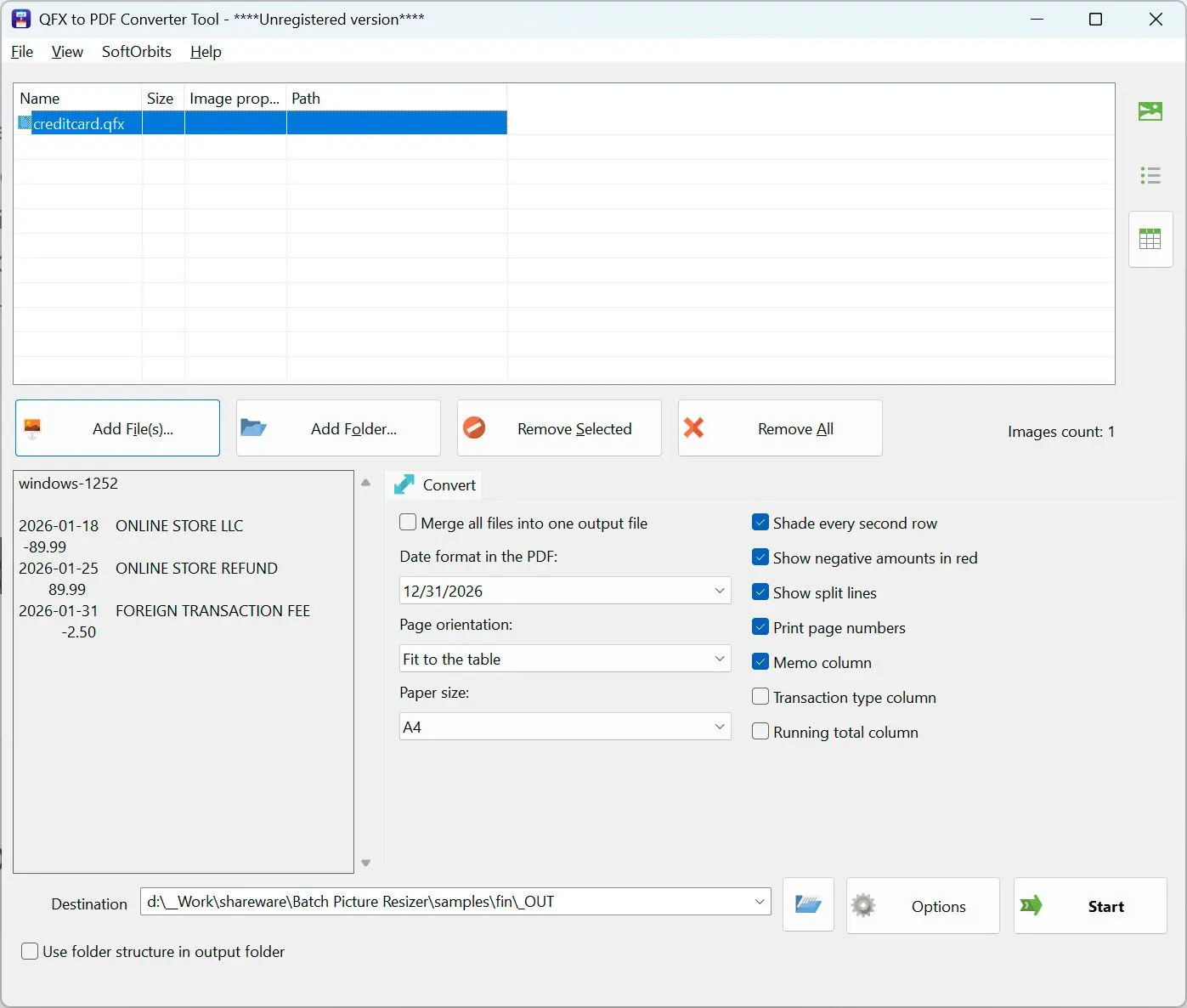
Your bank hands out a .qfx and assumes you own Quicken. If you do not, the download is a wall of tags. This opens it on your own PC and prints a statement you can read, file or send on.
Downloaded, and then stuck
QFX and OFX are money formats built for accounting software, not for people. Notepad shows you tags, the browser refuses to open it, and buying a subscription just to look at one download makes no sense. The parser here handles both dialects - the older tag soup and the newer XML - and turns whatever came out of the bank into a plain PDF.
How to use it
Load the download
Add a .qfx or .ofx file, several of them, or an entire folder of monthly downloads. Bank accounts, credit card statements and investment statements inside the same file are all picked up.
See what was found
The preview reports how many transactions were read and shows the first rows, so you know the file parsed correctly before you commit to a hundred pages of output.
Write the PDF
The table gets a header repeated on every page, page numbers in the footer, alternating row shading and amounts aligned to the right. Portrait or landscape is chosen from the width of the table.
Benefits
No Quicken, no subscription
A one-time program that reads the format directly. You do not install accounting software, create an account or sign in to anything just to see what is in a file you already own.
Both OFX dialects, one parser
Older files with unclosed tags and newer XML files are read by the same tokenizer, so it does not matter which vintage your bank exports. Cyrillic, CJK and Latin-1 text comes through without mangling.
The statement stays on your machine
Parsing and printing happen offline. A bank download lists every payee you have paid in a month, which is exactly the kind of file you should not be pasting into a web converter.
Why people use it
Debits you cannot misread
Money out is printed in color and in brackets at the same time, so the meaning survives a black and white printer, a fax machine and a reader who does not see red.
A running total when you want one
There is a checkbox for a running total column, off by default and named honestly: it adds up the rows shown in this report. It is not the bank's own balance, because OFX does not carry one per transaction.
Investment lines survive
Buys, sells and share movements are kept even when there is no cash amount attached - a share split moves units, not money, and dropping those rows would leave the statement incomplete.
FAQ
System Requirements
Quicken Statement PDF Exporter
Languages
1.0
9 Mb
September 5, 2026
- Windows 11/10/8.1/8/7 (32/64 bit)
- Intel i3, AMD Ryzen 5 or above
- 4 GB of RAM or above
- NVIDIA® GeForce® series 8 and 8M, Intel® HD Graphics 2000, Quadro FX 4800, Quadro FX 5600, AMD Radeon™ R600, Mobility Radeon™ HD 4330, Mobility FirePro™ series, Radeon™ R5 M230 or higher graphics card with up-to-date drivers
- 1280 × 768 screen resolution, 32-bit color
- 1 GB of free hard disk space or above
GRT requirements trial note