QuickBooks Statement PDF Exporter
Read the QBO Somebody Sent You
Open QBO and OFX bank files without QuickBooks and save them as a printable PDF statement or as a CSV table for Excel. Runs offline on your Windows PC. Free trial from GRTSoft.
Full seller details: Legal information.
A .qbo lands in your inbox from the bank or the bookkeeper, and the only software that opens it costs a subscription. This reads it on your own PC and gives you a printable statement or a spreadsheet.
A file for software you do not run
QBO exists to be imported, not opened. If you are not the one running the accounting package, it is a dead end - and uploading a full transaction history to a free web converter to peek inside is not a reasonable trade. This parses the file locally and writes something a person can actually use.
How to use it
Open the file
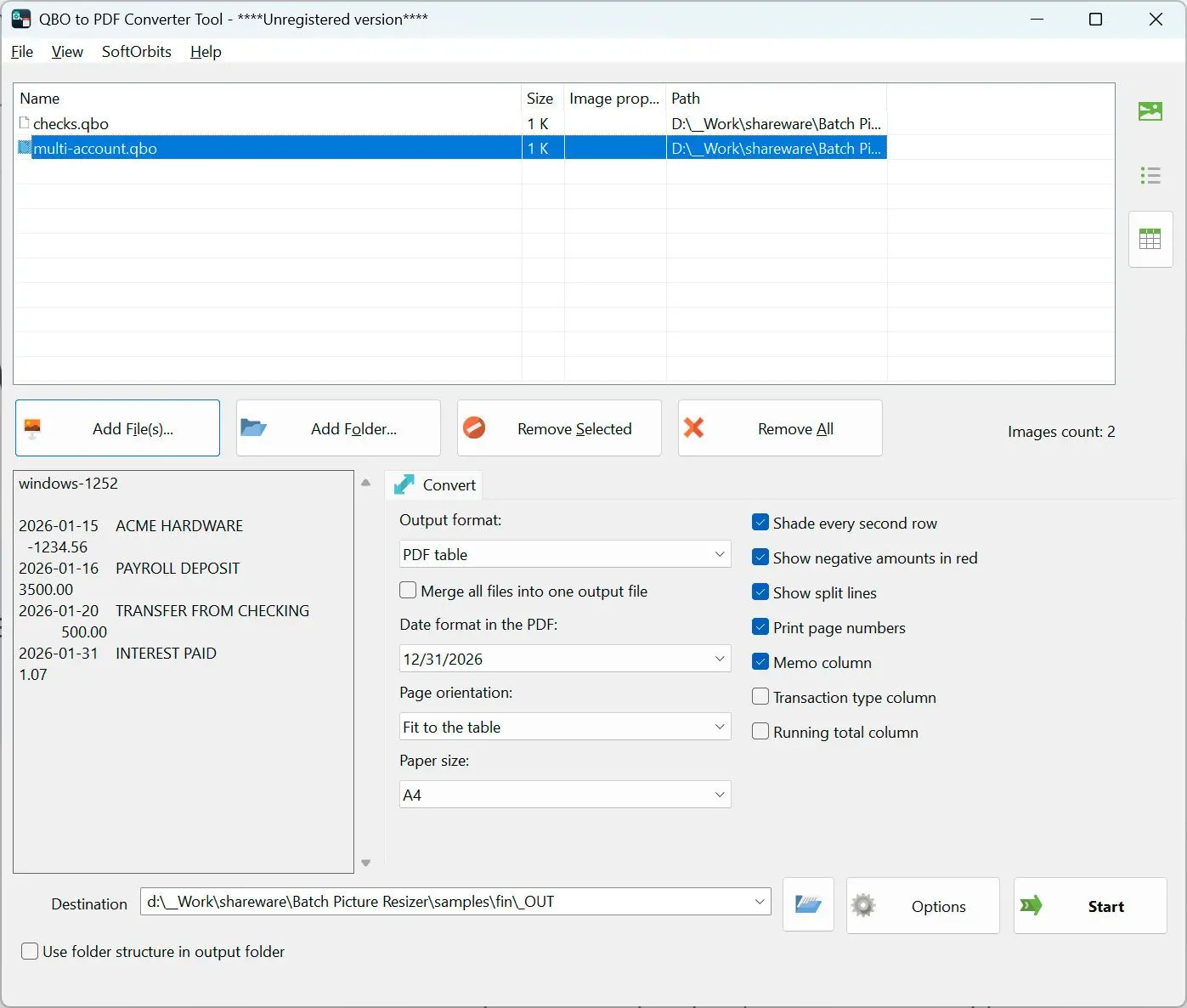
Add .qbo or .ofx files one at a time or by the folder. Both the old tag-based form and the newer XML form are read by the same parser, along with credit card and investment statements inside the same download.
Choose PDF or CSV
PDF is the default and is built for reading: repeating header, page numbers, shaded rows, amounts to the right. CSV is the choice when the numbers have to be sorted, filtered or totalled in Excel.
Convert and check
The preview shows how many transactions were recognized and what the first rows look like before anything is written. Then the file lands in the folder you picked, next to nothing else.
Benefits

No QuickBooks needed
The file is read directly, so you do not install or subscribe to accounting software to see a statement that was sent to you. Nothing is uploaded and no account is created.
A statement built for paper
The column header comes back on every page, no transaction is cut in half by a page break, and each page carries the source file name and the generation date in the footer - so a printed copy stays traceable.

CSV that Excel opens correctly
Written as RFC 4180 with a UTF-8 byte order mark, so accented and Cyrillic payees are not turned into rubbish on a double click. The header row stays in English in every language, because formulas and import maps depend on those names.
Why people use it
Money out marked twice
Negative amounts are shown in color and in brackets together. One of the two always survives - a black and white printout, a scan, a reader who does not see the color difference.
Merged files stay traceable
Combine several statements into one CSV and the account column switches itself on. A merged table that does not say which account a row came from is a defect, not a setting to remember.
Columns you choose
Date, check number, payee, memo and amount are printed by default. Type, category, the transaction identifier and a running total are checkboxes - most files leave those fields empty, and an empty column steals width from the payee.
FAQ
System Requirements
QuickBooks Statement PDF Exporter
Languages
1.0
9 Mb
August 20, 2026
- Windows 11/10/8.1/8/7 (32/64 bit)
- Intel i3, AMD Ryzen 5 or above
- 4 GB of RAM or above
- NVIDIA® GeForce® series 8 and 8M, Intel® HD Graphics 2000, Quadro FX 4800, Quadro FX 5600, AMD Radeon™ R600, Mobility Radeon™ HD 4330, Mobility FirePro™ series, Radeon™ R5 M230 or higher graphics card with up-to-date drivers
- 1280 × 768 screen resolution, 32-bit color
- 1 GB of free hard disk space or above
GRT requirements trial note